So is there a better way to manage this?
Personally I find that once your over 10 seats this becomes a very tedious process. Each company and department is different and I regularly find there are several challenges that we face when deploying out CAD Software:
- No common workstation environment, (OS and pre-requirements etc)
- Limited user rights on workstation
- Multiple configurations of an application
- Application side by side installations
- Installation order
- Time consuming local manual configuration (after installation)
- Update management
- Multiple variants of language packs
- License server pointers
- Data size
These challenges can make what should be a simple installation, complex and time consuming.
Here at Symetri we mitigate these challenges and the limitations in the Autodesk Collections Deployment methodology by using our CQI solution.
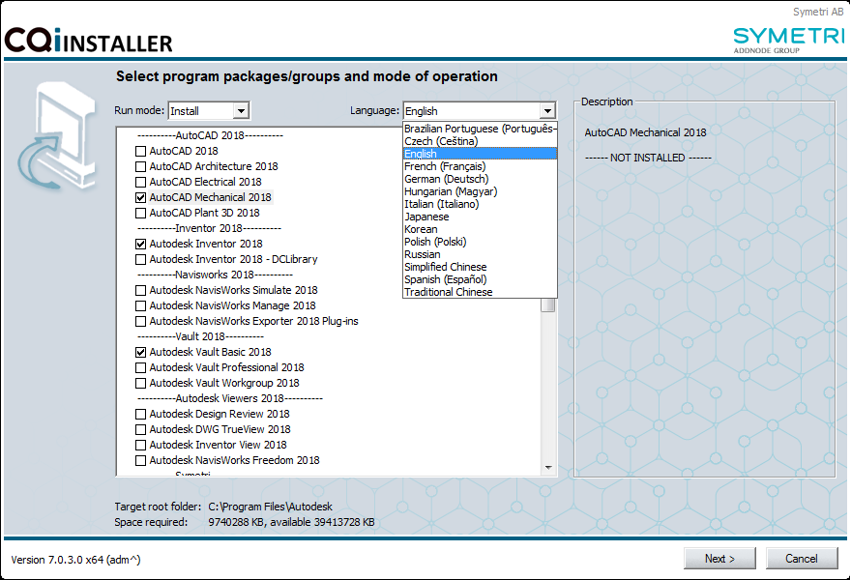
CQI is a solution that takes care of both installation, maintenance and configuration of CAD applications, other 3rd party applications and their customisations.
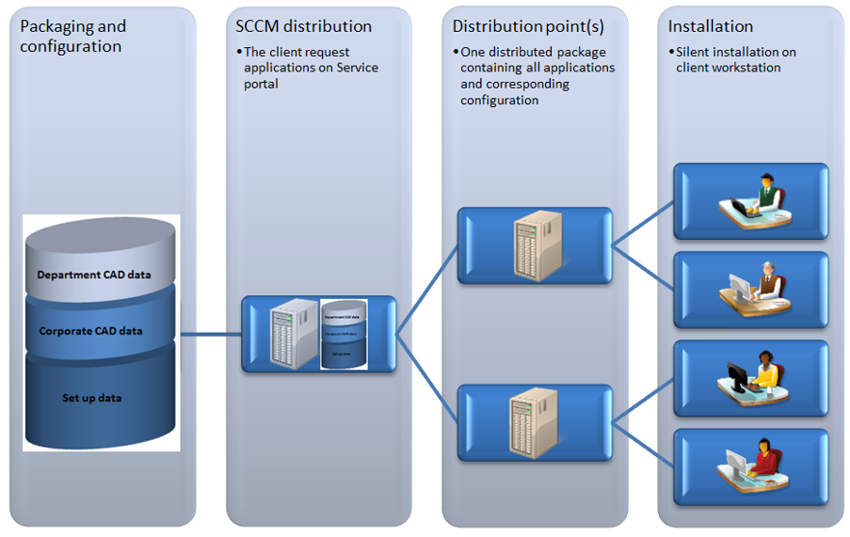
Our dedicated team have spent time packaging the collections ready for installation at client sites, making the installation of these collections as quick and straight forward as possible. CQI currently has more than 3000 users many of which have had this tailored to their environment to include Corporate and Departmental cad data as well as other tools used by the design teams. It can be directly installed or triggered via SCCM allowing it to be scaled from small to larger organisations.
Why not get in touch and find out how CQI could help you deploy out.